Bridging the Persona Gap: Secure, Single-Click Session Transfer in B2B2C eCommerce
Written byNathan Moore
Published onAug 04, 2026
In modern enterprise B2B and B2B2C eCommerce, users often occupy multiple distinct personas.
Consider this workflow: A school administrator or team athletic organizer spends their morning inside an administrative panel, customizing apparel designs, approving school branding, and adjusting budgets. On the one hand, they manage a catalog of custom apparel available for purchase by parents and students on a storefront. On the other, they also need to make purchases for their teams, departments, or entire student bodies.
Their work inside the admin is strictly operational. However, once those designs are approved, their role shifts. They transition to the storefront to place a B2B order of those same goods.
Traditionally, this persona transition carries significant friction. Users must log out of the admin portal, navigate to the storefront, and log in again, forcing them to manage duplicate sets of credentials across segregated authentication systems.
For our client, a national leader in customized branding and memorabilia, this friction caused a significant user-experience bottleneck. To eliminate it, we built a Secure Cross-Client Session Transfer Bridge on top of the Broadleaf Commerce microservices framework.
This post showcases how we customized Broadleaf to provide a seamless, single-click session transfer mechanism that securely transitions logged-in sessions between administrative and customer-facing frontends, while respecting complex B2B2C role-based permissions and account contexts.
The Challenge: The Multi-Role User Dilemma
Broadleaf Commerce, by default, distinguishes between two primary user classifications:
Admin Users: Business users who operate within the back-office Admin UI.
Customers: Shoppers who browse and buy on storefront applications.
By design, these users live in separate authentication contexts (Authorization Servers). Typically, customers cannot log into the admin, and admins do not log into the storefront, with the exception of customer service representatives (CSRs). However, our client’s ecosystem requires "hybrid" users who act as both back-office organizers and retail customers who shop on their own behalf.
Our customizations needed to address four requirements:
Frictionless UX: Allow select users to instantly hop between the Admin portal and the Storefront without re-entering credentials.
Unified Security Identity: Keep passwords, SSO identities, and global roles synced, while leaving downstream profile preferences (saved addresses, shopping carts) to their respective localized services.
Complex Account Contexts: Ensure transferring users land in the exact client Account context they have authorization to manage and which has their school’s branded apparel.
Cross-Team Collaboration: Deliver clean, SDK-like hooks and backend endpoints that allow frontend partner teams to integrate the feature with minimal effort.
The Solution: A Secure, Cross-Client Session Bridge
Broadleaf Commerce offers robust out-of-the-box SSO for shared customer pools, but SSO falls short of our use case, both functionally and from a security best-practice standpoint. Because our ecosystem includes customer-only, admin-only, and hybrid users, a single Authorization Server would require complex, brittle security layers to prevent unauthorized access and customizations beyond the Authentication microservice.
Segregating Authorization Servers for the Admin and Storefront environments ensured clean, robust security boundaries. To connect these contexts seamlessly, we adapted Broadleaf’s core eCommerce primitives. By leveraging patterns from Broadleaf’s native CSR "shop-as-customer" flow, we designed a secure, bi-directional session transfer protocol to bridge these security realms.
1. Unified Identity with Segregated Profiles
First, we structured the database model to support hybrid personas cleanly within a single database schema:
The Shared Auth Layer: In AuthenticationServices, both the Admin User and Customer are represented by the User class. This class is the single source of truth for passwords, credentials, and active roles. For our use case, we added password synchronization between the User records by matching their usernames so that the typical password change and reset flows remained unchanged.
Segregated Downstream Services: Downstream, the AdminUser and Customer records remain decoupled. This separation keeps administrative audit logs apart from consumer profile details, such as shopping histories or saved payment methods. Additionally, Broadleaf already allows Customers to be added to one or more Accounts with distinct roles in each.
2. High-Level Flow: The Transfer Ceremony
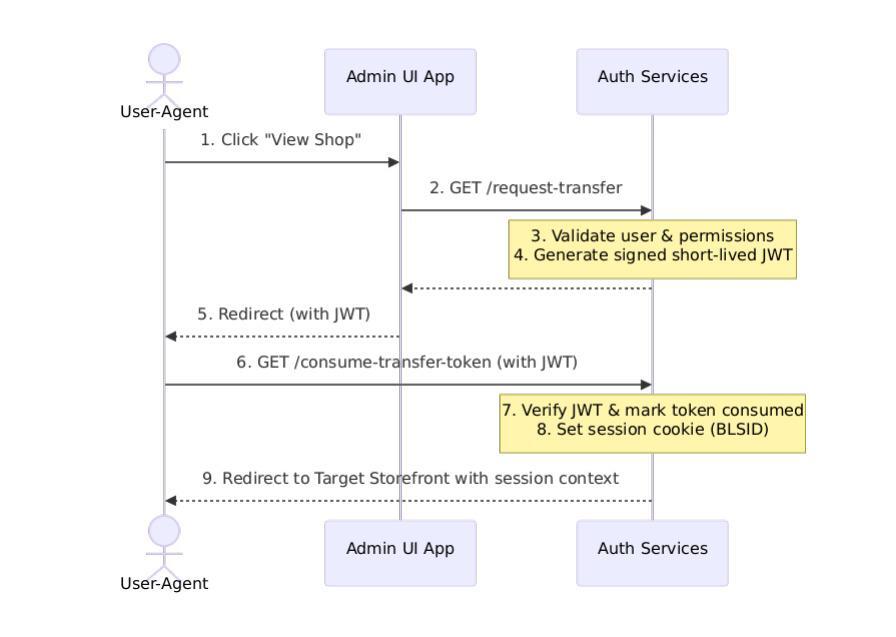
The session transfer employs a secure, two-stage cryptographic handshake: Request and Consume.
Stage 1: Requesting the Transfer (/request-session-transfer)
When an authenticated user clicks the "View Online Shop" button in the Admin portal, the browser redirects them to a secure endpoint on the Auth Services layer:
Dynamic Authority Enforcement: The endpoint strictly guards access. It first checks the active user's Spring Security authorities for the custom permission, e.g., ALL_B2B_AUTH_SESSION_TRANSFER. If not directly present in their static authorities, the system falls back to a deep evaluation of their assigned B2B Account Roles, ensuring that permissions granted dynamically via partner accounts are fully respected.
Early Permission Validation: If the target application is a restricted B2B storefront, the endpoint performs a fail-fast validation check. It verifies if the transferring user has active "B2B Purchase Access" permissions (e.g., B2B_PURCHASE) before generating any tokens.
Aggressive Token Lifespans (5-Second TTL): Upon successful validation, the system generates a cryptographically signed, single-use Session Transfer Token (JWT). To support a defense-in-depth security posture, this token possesses an extremely aggressive lifetime of just 5 seconds (SESSION_TRANSFER_TOKEN_EXP_TIME_SEC = 5). Rather than writing a custom persistence layer to track these short-lived tokens, we reused the framework's existing ImpersonationTokenNonceService to handle the token's single-use lifecycle safely.
The Handshake Redirect: The system redirects the user to the destination client’s authentication domain, appending the signed token as a query parameter.
Stage 2: Consuming the Token (/consume-session-transfer-token)
The destination application receives the redirect at its consumption endpoint:
Cryptographic Verification: The endpoint verifies the signature of the incoming JWT. Spring Cloud Config Server manages the signing keys dynamically, supporting seamless key rotation. It also verifies that the token's 5-second lifetime has not expired.
Single-Use Enforcement: The system immediately marks the token as consumed in the nonce database, instantly rejecting any replay attacks.
Session Establishment: The backend loads the matching user identity and issues a secure session cookie (BLSID) matching the target application's domain. The backend also appends auditing claims (such as ISSUED_FROM_SESSION_TRANSFER) to ensure all downstream actions are traceable back to this session transfer.
Context-Aware Landing: Finally, the system redirects the user to the storefront's homepage in a fully authenticated state.
The B2B Session Transfer Security Checklist
When building a bridge between isolated applications, securing the transaction is paramount. Below is the checklist we enforced to ensure zero-trust compliance:
Cryptographic Short TTLs (Micro-TTL): Keep the session transfer token lifetime extremely brief (5 seconds or less). This reduces the window for interception or replay attacks.
Strict One-Time Nonces: Implement a fail-fast nonce tracking service. Once a token is processed, immediately delete and invalidate the nonce so it can never be consumed again.
Strict Domain Allowlisting: Validate all redirect domains on both the request and consume endpoints against an authorized registry (ClientRedirectService.isValidPostAuthenticationSuccessUrl). Never redirect to a domain that is not in the allowlist.
Audit Trail Claims: Always attach traceable metadata to session cookies established via transfers (e.g., ISSUED_FROM_SESSION_TRANSFER = true). This ensures administrative and security reporting can distinguish between formal password logins and session bridge transfers.
Upfront Permissions Guard: Verify authorization before token issuance. Never generate a transfer token for a restricted application only to let a downstream service reject the user after redirection.
Solving Advanced B2B Use Cases
During implementation, we identified three critical B2B requirements that standard storefront flows do not support out of the box: B2B Purchase Access Control, "Customerless" Session Transfers for Sales & Support, and Implicit Frontend-to-Admin Resolution.
B2B Purchase Access Control
B2B portals restrict access to authorized users with specific purchasing privileges. In our implementation:
We configured a bespoke permission (e.g., B2B_PURCHASE) inside TenantServices for each B2B application.
The system enforces this at multiple points:
Fail-Fast on Transfer: The /request-session-transfer logic rejects the transfer immediately if the user lacks the required permission.
OAuth2 Token Verification: The OAuth authorization process validates that the user possesses explicit authorization to purchase goods in a B2B context for that specific partner account.
API-Level Enforcement: Policy checks reject downstream API calls if the access token lacks a synthetic B2bAccessTokenClaimNames.B2B_PURCHASE_ACCESSIBLE_APP_ID claim.
This rigorous multi-layered enforcement ensures that transferring an administrative session never bypasses strict B2B organizational rules.
"Customerless" Session Transfers for Sales & Support
What happens when a Super Admin or Sales Representative, who does not have a storefront Customer profile, needs to access a B2B storefront to assist a client?
Creating dummy customer profiles for every sales representative introduces a maintenance and security hazard. To solve this, we extended the session transfer mechanism:
Context-Only Transfer: If a Super Admin or Sales Rep initiates a session transfer, the system detects that they do not possess a standard customer profile.
Account Context Binding: Instead of mapping them to a storefront customer, the transfer mechanism grants them an authenticated session bound directly to the target client's Account Context (Partner).
Representative Identity Preservation: During token generation, the service preserves and propagates key Identity Provider (IDP) and representative claims (such as third-party registration IDs, principal names, and Rep codes). This ensures that while they act on behalf of a partner within the storefront, their administrative identity is preserved in audit logs.
Implicit Frontend-to-Admin Resolution
To keep the storefront frontend light and decoupled, storefront applications do not need to hardcode the Admin's client ID, Auth URIs, or homepage URLs. When a user requests a storefront-to-admin transfer, the backend endpoint detects that the current client is not an admin. It automatically resolves the corresponding Admin client details and default redirect URIs based on the current tenant and server context, reducing configuration overhead.
Seamless Developer Collaboration: Backend APIs to Frontend Hooks
Because this feature spans the entire microservice ecosystem, its success depended on excellent collaboration between backend and frontend development teams.
The backend team provided clean, self-contained endpoints and metadata configurations, while frontend engineers integrated them into the customized user interfaces.
Step 1: Discovering the Auth URL dynamically
To prevent hardcoded URLs across different environments (local, staging, production), the backend exposes the target authentication domains dynamically. The storefront or admin client queries a specialized UrlResolverEndpoint which returns the dynamic authBaseUri:
In the Next.js storefront (commerceweb), developers can check if the customer has the authority to transfer their session, then cleanly redirect them.
Here is an example of how the frontend React component utilizes custom hooks and context to render a secure transfer button:
import { useContext } from 'react';

import { useAuth } from '@broadleaf/auth-react';

import qs from 'query-string';

import { useUserOperations } from '@broadleaf/commerce-shared-react';

import { PrimaryButton } from '@app/common/components';

import { PartnerContext } from '@app/common/contexts';

export default function SessionTransferWidget() {

  const { clientId } = useAuth();

  const { state: partnerState } = useContext(PartnerContext);

  // Resolve configured transfer settings dynamically

  const storefrontAuthURL = "https://auth.commerce.com/auth/request-session-transfer";

  const requiredScope = "ALL_B2B_AUTH_SESSION_TRANSFER";

  // Check if the current user possesses the transfer scope permission

  const { userOperationInfo } = useUserOperations(requiredScope);

  const hasPermission = userOperationInfo?.content?.some(

    op => op.scope === requiredScope

  );

  // If permitted and an Account Context is selected, render the transfer trigger

  if (!hasPermission || !partnerState?.currentPartner) return null;

  const handleTransfer = () => {

    const params = {

      client_id: clientId,

      partnerId: partnerState.currentPartner.id,

    };

    // Securely launch the transfer handshake in a new window

    window.open(

      `${storefrontAuthURL}?${qs.stringify(params)}`,

      '_blank',

      'noopener,noreferrer'

    );

  };

  return (

    <div className="container justify-items-center mt-16 mx-auto px-4 w-full">

      <PrimaryButton onClick={handleTransfer}>

        Transfer Current Session to Admin

      </PrimaryButton>

    </div>

  );

}
Architect's Tip: Simulating Cross-Domain Cookies Locally
Testing cross-client session transfers requires testing redirects across separate domains (e.g., admin.localhost to b2b-storefront.localhost). Because browsers strictly enforce cookie safety, setting session cookies (BLSID) across different domains can fail on your local machine if not configured correctly.
Here are the key tips we use to simulate a multi-domain environment locally:
1. Leverage Local Domain Mapping (/etc/hosts)
Avoid testing using plain localhost or IP addresses. Instead, define explicit subdomains mapping to your loopback address in your local /etc/hosts file:
A common pitfall is attempting to share cookies across domains using a wildcard scope (like .local.com). Our architecture actively avoids this to maintain strict domain isolation and security boundaries:
Gateway Proxying: The Admin application is served through the Admin Gateway, and the storefront is served through the Commerce Gateway. Both gateways proxy their respective Auth Services, ensuring that the original BLSID session cookie is set strictly on the requester's specific domain (e.g., admin.local.com or storefront.local.com).
The "Wrong Domain" Challenge: Because of this strict isolation, the browser will never send the Admin's BLSID cookie to the storefront's domain (or vice versa).
The Redirect Solution: To bridge this gap securely, the /request-session-transfer endpoint executes a browser redirect to <target-app-domain>/consume-session-transfer-token. Because this final token consumption request is made directly on the target's domain, the backend can issue the new BLSID session cookie directly on the target application's domain. No cross-domain cookie sharing or wildcard domains are required.
3. Trust Self-Signed SSL Certificates
Most modern browsers will silently block cross-origin redirect cookies if the HTTPS connection uses an untrusted, self-signed local certificate. Use tools like mkcert to generate local, trusted SSL certificates for your custom local domains (*.local.com), ensuring seamless local validation of cookie-bound session handshakes.
Conclusion: Elevating the Enterprise B2B Experience
By looking beyond basic username/password setups and leveraging the underlying primitives of the Broadleaf Commerce microservices framework, we constructed a session transfer system that delivers the best of both worlds: strong enterprise security and a friction-free user experience.
The session transfer bridge highlights the flexibility of microservice-driven commerce. Rather than writing heavy, custom auth servers or compromising security boundaries, simple patterns and secure cryptographic handshakes can unite disjointed client experiences into a single, cohesive digital workspace.
Adapted from the business logic customization and impersonation concepts within the Broadleaf Commerce ecosystem. For official extension guides and customization patterns, visit the Broadleaf Developer Portal.